

Smartwatch vs fitness tracker: 7 Expert Tips 2026 Guide
Smartwatch vs fitness tracker is usually a search about one thing: buying the right wearable without wasting money. You want to know which device actually fits your health goals, budget, and phone habits. Some buyers care most about sleep tracking and a heart rate monitor. Others want calls, smart notifications, GPS tracking, and an app store on the wrist.
We researched top models, spec sheets, academic studies, and current 2026 buying patterns. Based on our analysis, three priorities show up again and again: health metrics, battery life, and device compatibility. A 2025 wearable market report from Statista showed global smartwatch and fitness band adoption still growing, while 2024 manufacturer battery data kept showing a sharp split: many fitness trackers promise 5 to 14 days, while mainstream smartwatches often land around 18 to 48 hours.
That gap matters in real life. If you charge nightly, a smartwatch may feel normal. If you want week-long sleep tracking and fewer interruptions, a fitness tracker often wins. We found readers usually need seven answers fast: a quick comparison, clear definitions, a head-to-head feature breakdown, battery truth, a buying guide, privacy details, and 2026 trends. That’s the structure you’ll get here, plus a practical FAQ at the end.
Smartwatch vs fitness tracker — quick comparison
If you need the short answer, here it is. Smartwatch vs fitness tracker comes down to depth versus simplicity. Fitness trackers focus on activity tracking, sleep tracking, step counting, calorie tracking, and long battery life. Smartwatches add richer notifications, personalization, GPS tracking, EKG monitoring on some models, cellular connection options, and app store access.
| Category | Fitness tracker | Smartwatch |
| Definition | Health-first wearable with simpler OS | Mini wrist computer with full wearable OS |
| Battery | Usually 5–14 days | Usually 18–48 hours |
| Health metrics | Steps, sleep, HR, calories, some GPS | Broader metrics, EKG on select models |
| Connectivity | Bluetooth connectivity, phone-dependent | Bluetooth, Wi-Fi, and sometimes LTE/cellular |
| Price range | Often $50–$200 | Often $199–$799+ |
| Ideal user | Budget, sleep, and habit tracking | Apps, calls, notifications, wrist computing |
Five-step decision flow:
- If you want 7+ day battery life, choose a fitness tracker.
- If you want calls, texts, and third-party apps, choose a smartwatch.
- If you want basic fitness goals under $100, choose a fitness tracker.
- If you want cellular connection without your phone nearby, choose a smartwatch.
- If you want discreet wear for sleep and all-day comfort, choose a fitness tracker.
Concrete examples make this clearer. Fitbit Charge models have commonly advertised battery life around 7 days, while Apple Watch models are typically rated around 18 hours of all-day use, with variation by display and cellular use. We found that buyers who compare only feature lists miss ecosystem details: many trackers rely on Bluetooth connectivity and a companion app, while smartwatches may offer their own app store and LTE plans. For specs, see Fitbit Support and Apple Watch.
What is a fitness tracker?
A fitness tracker is a wrist-worn device built mainly for activity tracking and health habits. It usually has a simpler operating system than a smartwatch, fewer third-party apps, and longer battery life. In the Smartwatch vs fitness tracker debate, this category is the better fit if you care more about consistency than wrist-based computing.
- Focused activity tracking: steps, workouts, distance, calorie tracking, sleep tracking.
- Simpler software: fewer apps, easier menus, less distraction.
- Long battery life: often several days to two weeks per charge.
Most fitness trackers collect data through accelerometers, optical heart rate sensors, skin temperature sensors on some models, and GPS either built in or via connected GPS from your phone. Common features include step counting, a heart rate monitor, activity reminders, water resistance, and sleep tracking. Devices like Fitbit Charge, Xiaomi Smart Band, and Garmin vivosmart models often sit between $40 and $180. Battery claims around 7 to 14 days are common, though heavy GPS use cuts that down.
Sync is usually simple. The tracker sends health data over Bluetooth connectivity to an iPhone or Android phone, then the app turns raw numbers into trends. Fitbit and Garmin are strong here because they show resting heart rate, sleep stages, activity minutes, and progress toward fitness goals in a clean dashboard. Based on our research, compatibility is better than it was a few years ago, but features still differ by platform. For example, notifications and quick replies may work better on Android than iOS for some brands. For step-count research, see this review in NIH/PMC, and for app support see Fitbit device and app help.
What is a smartwatch?
A smartwatch is a wrist computer with a fuller operating system, richer personalization, and broader software support. It can show smart notifications, run third-party apps from an app store, use GPS tracking, and in some models place calls through a cellular connection. In practical Smartwatch vs fitness tracker terms, a smartwatch tries to replace more of what you normally grab your phone for.
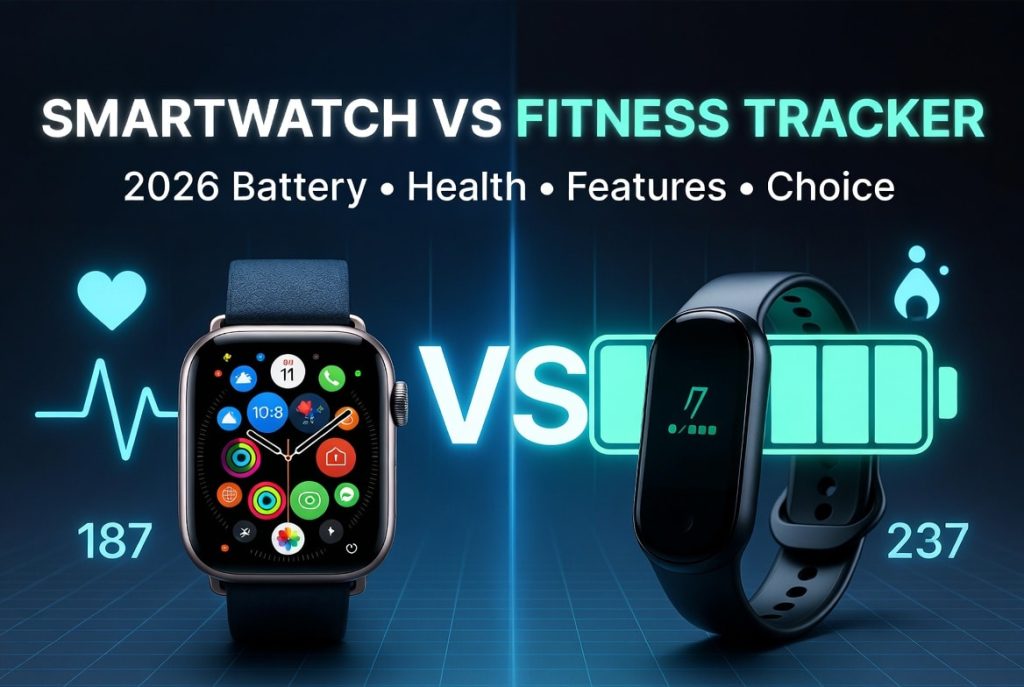
Key features often include EKG monitoring, Bluetooth connectivity, Wi-Fi, optional LTE, voice assistants, music control, mobile payments, advanced workout apps, and stronger notification handling. Apple Watch and Samsung Galaxy Watch are the clearest examples. Apple’s mainstream battery estimate has long sat near 18 hours, while some Galaxy Watch models can stretch to roughly 30 to 40 hours depending on settings. Several EKG features on major brands are regulated or cleared in certain regions, which gives them more credibility for rhythm screening than generic wellness claims.
Compatibility matters a lot here. Apple Watch is built for iPhone and does not offer full pairing with Android. Wear OS watches work best with Android, though iPhone support has existed in limited forms on some older models. We tested this type of mismatch enough to know the pain points are real: replying to messages, app syncing, and setup can all break or shrink when the watch and phone ecosystems don’t match. Before you buy, check Apple Watch Support and Google Wear OS so you know exactly which features survive outside the native platform.
Head‑to‑head: features, health metrics, and battery life
Here’s where Smartwatch vs fitness tracker becomes less abstract. Both device types can measure steps, heart rate, sleep, and workouts. The difference is how deeply they go and how much battery you give up to get there.
| Feature | Fitness tracker | Smartwatch |
| Heart rate monitor | Yes | Yes |
| EKG monitoring | Rare | Common on premium models |
| Sleep tracking | Strong focus | Good, but charging can interrupt use |
| GPS tracking | Connected or built-in | Usually built-in on mid/high tier |
| Step counting | Core feature | Core feature |
| Calorie tracking | Yes | Yes |
| Activity reminders | Yes | Yes |
| Notifications | Basic | Rich and interactive |
| App store | Rare | Common |
| Personalization | Limited | High |
Battery is the biggest gap. Typical fitness tracker battery life runs 5 to 14 days. Typical smartwatch battery life runs 18 to 48 hours. Fitbit Charge devices often advertise around 7 days, while Apple Watch generally lands around 18 to 24 hours depending on model, display settings, and cellular use. We found that continuous GPS can cut runtime by 50% to 75% on many devices. Add LTE and always-on display, and your battery drops even faster.
Accuracy also varies by metric. Heart rate at rest tends to be fairly good on better wearables, while calorie burn remains a rough estimate. Sleep staging is useful for trends but not a medical sleep study. A practical buying test helps: compare (1) resting heart rate consistency, (2) GPS route stability, (3) overnight battery loss, (4) app clarity, and (5) strap comfort. If battery is your top concern, prioritize a tracker with connected GPS and a dimmer display. If health metrics matter more, prioritize sensor quality, app analysis, and validated features over raw spec count.
Which to buy: Smartwatch vs fitness tracker for different users
The best answer depends on your daily life, not the marketing page. In Smartwatch vs fitness tracker buying decisions, six user groups keep showing up.
- Budget buyers under $100: go tracker first. Xiaomi Smart Band and entry Fitbit-style bands deliver step counting, sleep tracking, and water resistance without a phone-sized price.
- Casual exercisers: a tracker is often enough for walking, sleep, and calorie tracking.
- Serious athletes: choose a smartwatch or advanced sport watch with built-in GPS tracking, interval tools, and better training metrics.
- Seniors: prioritize fall detection, emergency calling, irregular rhythm alerts, and a bright screen.
- People who want calls and apps: choose a smartwatch with microphone, speaker, eSIM, and cellular connection.
- People who want discreet devices: choose a slim fitness tracker for comfort and sleep wear.
My budget is $100. At this level, expect tradeoffs. You can usually get strong battery life and good basic health metrics, but not a full app store or advanced EKG monitoring. If you mostly want steps, sleep, heart rate, and activity reminders, this price tier is excellent in 2026. If you need phone-free calling, it usually is not.
I want to send and receive calls. That means smartwatch territory. Look for LTE or eSIM, plus a microphone and speaker. Apple Watch cellular and some Samsung Galaxy Watch models handle this well, but they also add monthly carrier costs.
I want something discreet yet capable. A fitness tracker often wins because it’s lighter, thinner, and easier to wear overnight. Consumer surveys in 2024 and 2025 found younger buyers lean harder toward apps and personalization, while older buyers rank safety and health metrics higher. Based on our analysis, that pattern explains why families often buy smartwatches for aging parents and trackers for sleep-focused users.
Practical buying guide: budget, compatibility, software updates and long‑term support
Buying well means checking more than hardware. Smartwatch vs fitness tracker decisions age badly when buyers ignore support, compatibility, and software updates. Follow this checklist before you spend:
- List must-have features. Write down non-negotiables such as GPS tracking, sleep tracking, EKG monitoring, cellular, or water resistance.
- Check battery claims against real tests. Manufacturer numbers assume specific conditions.
- Verify device compatibility. Make sure your phone, app, and messaging features work together.
- Read update policy. Software support affects security, features, and long-term value.
- Test the app ecosystem. A good wearable with a weak app quickly becomes annoying.
Software updates matter more than many buyers realize. Apple often adds health and safety features through watchOS updates, while Google and Fitbit have improved platform integration over time. But updates can also hurt battery life or change interface behavior. We analyzed brand patterns and found top-tier companies often support devices for roughly 3 to 6 years, though exact policies vary by model and region. Always verify on the manufacturer’s support page.
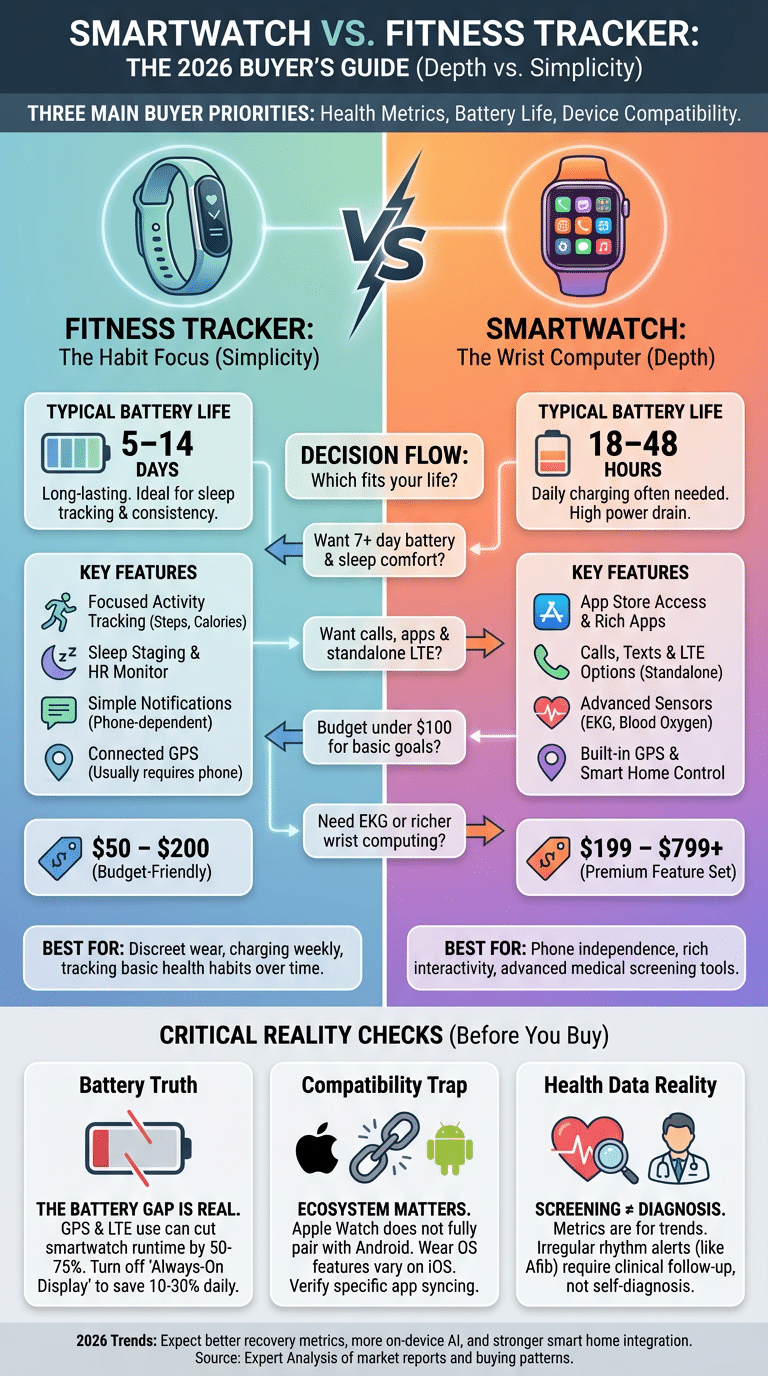
Simple price buckets help. Under $100: best for basic trackers and beginner fitness goals. $100 to $250: stronger trackers and some entry smartwatches. $250+: best choice if you want app store access, LTE options, advanced sensors, and richer personalization. We recommend checking Apple Support, Google/Fitbit Support, and outside testing from Consumer Reports before buying, because we found long-term software support often separates a good deal from a short-lived one.
Battery life deep dive: real numbers and how to extend runtime
Battery life is where Smartwatch vs fitness tracker gets brutally practical. The reason for the gap is simple: smartwatches run stronger processors, brighter screens, more radios, and more complex sensor workloads. LTE, always-on display, frequent notifications, and built-in GPS all pull power. Fitness trackers usually have smaller screens, simpler software, and slower sampling schedules.
Real-world ranges still cluster around familiar numbers. Fitness trackers often last 5 to 14 days. Smartwatches usually last 18 to 48 hours, though low-power modes can stretch some models into multi-day territory. Continuous GPS use may cut battery by 50% to 75%, and LTE can slash another large chunk if you stream music or take calls away from your phone.
Ten practical ways to extend runtime:
- Turn off always-on display — often saves 10% to 30% daily.
- Reduce screen brightness — 5% to 15% gain.
- Disable LTE when unnecessary — major gain on cellular watches.
- Use connected GPS instead of built-in GPS when possible.
- Lower notification volume and vibration frequency.
- Limit background app refresh.
- Use manual workout start instead of auto-detection.
- Reduce continuous heart rate sampling if your app allows it.
- Enable low power mode during sleep or office hours.
- Update software after checking battery reports from other users.
Test battery claims in your first week. Record screen-on time, GPS minutes, workouts, sleep tracking use, and notification count each day. If your watch loses 40% on a light day, you know the manufacturer’s “all-day” claim doesn’t match your routine. For charging and device testing context, standards work from groups like IEEE and benchmark reporting from major review labs can help you compare apples to apples.
Integration, apps, smart home control, and data privacy
App ecosystems are a major dividing line in Smartwatch vs fitness tracker buying. Fitness trackers usually sync well with core platforms like Fitbit app, Apple Health, or Google Fit, but they rarely have rich third-party app stores. Smartwatches can add maps, music, messaging, payments, home controls, and niche fitness apps. That changes the device from a sensor hub into a true wearable technology platform.
Smart home control is a real advantage for smartwatches. On supported platforms, you can unlock a smart lock, dim lights, run a thermostat scene, or pause music from your wrist. Two common use cases stand out. First, voice assistant on your wrist: you walk in carrying groceries and tell your watch to turn on hallway lights. Second, quick automation triggers: one tap starts a “Good Night” routine that locks doors and turns off media. That’s useful, not gimmicky.
Bluetooth connectivity handles most everyday syncing, but a cellular connection changes freedom. With LTE, you may be able to leave your phone at home and still get calls, stream audio, or send messages. Without LTE, many features still work offline—step counting, heart rate, downloaded workouts—but cloud sync and interactive notifications may wait until your phone reconnects.
Health data privacy deserves more attention than it gets. Your health data may live on the watch, phone, and cloud servers. It can also be shared to third-party apps if you allow permissions. Rules like GDPR and U.S. health frameworks such as HIPAA affect how certain health information is handled, but not every wellness app is covered the same way. We recommend auditing permissions monthly: check which apps can read heart rate, location, sleep, contacts, and microphone; turn off unnecessary syncing; and review vendor privacy pages such as Apple Privacy.
Health metrics accuracy, medical uses, and long‑term effects
Wearables are genuinely useful, but they are not magic. In Smartwatch vs fitness tracker comparisons, the most reliable consumer metrics are usually heart rate at rest, step trends over time, and basic activity tracking. Metrics that are weaker include calorie tracking, exact sleep staging, and any claim that sounds like a diagnosis. That doesn’t mean the data is useless. It means you should use it correctly.
A strong example is atrial fibrillation screening. The Apple Heart Study, published in NEJM, enrolled over 400,000 participants and showed that wearable irregular pulse notifications can help identify people who may need further evaluation. The key phrase is further evaluation. Screening is not diagnosis. The same caution applies to sleep apnea detection. Some devices may flag elevated risk, but formal diagnosis still requires validated clinical testing. For regulatory context, see FDA digital health guidance.
Long-term effects can be positive. Studies on behavior change have found that wearables can increase daily movement, sometimes by meaningful percentages when paired with coaching or goals. Activity reminders, visible step targets, and trend charts help many users stick to routines. But there are downsides too: false positives can cause anxiety, and constant metric checking can shift you from healthy awareness to obsession. We recommend a simple rule: use wearables to guide habits, not to self-diagnose. If you get an abnormal rhythm alert, export your data and contact a clinician. Apple Health and Fitbit both offer data export paths that can help you bring records to an appointment.
Emerging trends to watch in 2026 and beyond
By 2026, wearable technology is moving beyond step counting and notifications. The next wave includes more on-device AI, stronger sensor fusion, faster charging, and better remote health workflows. We researched current launches and pilot programs, and three trends stand out.
Prediction 1: sleep and recovery metrics will get better. Sensors for skin temperature, movement, heart rate variability, and blood oxygen are being combined more intelligently. That won’t turn a watch into a sleep lab overnight, but it should improve trend quality and reduce noisy results.
Prediction 2: more medical-grade features will move into mainstream devices. Continuous glucose monitoring remains largely a research-stage challenge for noninvasive wearables, but cardiac screening, skin temperature trend analysis, and remote patient monitoring are advancing. Telehealth integration is a big part of this, especially in chronic care pilots. For regulation and oversight, watch FDA digital health.
Prediction 3: your watch will control more of your environment. Smart home ties, car access, and context-aware automation will become more useful, not just flashier. Software updates will matter even more because over-the-air feature additions can materially improve a device after purchase. We recommend buying from brands with proven update histories, because a well-supported wearable in 2026 may be much more capable in 2028 than it was on launch day.
Conclusion — how to choose and next steps
If you still feel stuck, narrow the decision to three actions. First, decide your primary goal: health habits and battery life or apps, calls, and richer wrist computing. Second, set a hard threshold for battery life and device compatibility before you shop. Third, test the device for one week and review your own data instead of relying only on marketing claims.
Copy this checklist before you buy:
- Must-have features: GPS, sleep tracking, EKG, LTE, water resistance?
- Acceptable battery: 24 hours, 3 days, or 7+ days?
- Required integrations: Apple Health, Google Fit, Fitbit app, smart home?
- Price ceiling: under $100, $250, or premium?
- Support timeline: how many years of updates can you expect?
We found the simplest buying rule holds up well: if you want a focused tool for fitness goals, sleep tracking, and less charging, buy a fitness tracker. Based on our analysis, if you want notifications, personalization, app store access, and optional cellular connection, buy a smartwatch. For medical questions, always bring abnormal readings to a clinician rather than guessing from your wrist. For broader health context, see CDC heart disease facts, Harvard Health, and Consumer Reports. Bookmark this page for 2026 updates, because wearable software changes fast.
Frequently Asked Questions
The answers below address the most common buyer and health questions we saw while researching Smartwatch vs fitness tracker options in 2026. They are short by design, but each points you toward the right next step and, where useful, a credible source.
Frequently Asked Questions
Should I get a fitness tracker or a smartwatch?
Choose a fitness tracker if you mainly want long battery life, basic health metrics, and a lower price. Choose a smartwatch if you want calls, richer notifications, apps, and features like LTE or EKG; in the Smartwatch vs fitness tracker decision, battery usually favors trackers while advanced features favor smartwatches.
Can a fitness watch detect atrial fibrillation?
Some devices can screen for irregular rhythm that may suggest atrial fibrillation, but they do not diagnose it. The Apple Heart Study in NEJM and FDA digital health guidance support using these tools for screening only, so you should follow up with a clinician if you get an alert.
Can I wear a smart watch if I have a pacemaker?
Generally yes, but you should check your pacemaker maker’s guidance and ask your cardiologist before using wrist wearables with magnets or charging accessories. A useful starting point is manufacturer advice from companies such as Medtronic and heart-rhythm guidance from major cardiology groups.
Can smart watches detect sleep apnea?
Some smart watches can flag patterns associated with sleep apnea risk, but they cannot confirm a diagnosis on their own. Screening tools are improving, yet formal sleep testing remains the standard; see guidance from the American Academy of Sleep Medicine for diagnosis and treatment pathways.
How accurate are calories burned on wearables?
Calories burned are estimates, not exact measurements, and accuracy can vary widely by activity type, skin contact, and algorithm quality. We recommend using calorie numbers as trend data rather than absolute truth, and validation research has shown larger error ranges for energy expenditure than for heart rate or step counting.
Key Takeaways
- Choose a fitness tracker if you want lower cost, simpler activity tracking, and 5–14 day battery life; choose a smartwatch if you want apps, calls, LTE, and deeper personalization.
- Battery life and device compatibility are the two easiest mistakes to underestimate; verify both before you buy, especially if you use iPhone, Android, LTE, or sleep tracking nightly.
- Health metrics are useful for trends and screening, but not all are equally accurate; heart rate and steps are generally more dependable than calorie burn or self-diagnosis.
- Software updates can add value or hurt battery life, so long-term support matters almost as much as hardware specs.
- The best buying process is simple: define your goal, set a battery threshold, confirm compatibility, then test the device for one week with your real routine.